
Leganto November 2025 Release Notes
December 2025 Sneak Preview
-
Instructors can set "No list expected" from the LMS
-
View newer editions available for purchase
Main Features
Link Items to Library Collection After Syllabus Import
November 2025 Leganto URM-239059
When instructors or library staff upload a syllabus to create a list, Leganto now provides a step-by-step workflow to help link list resources to items available in the library.
After the syllabus is uploaded, users see a Check library availability badge in the right pane whenever items in the created list are not connected to inventory. The badge remains visible until all items with availability issues are resolved.
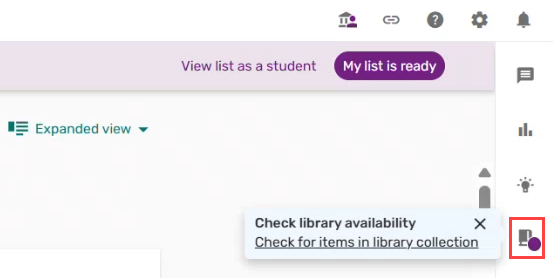
Selecting this badge opens a new pane that lists all items that do not have any inventory. Items with external links are not included.
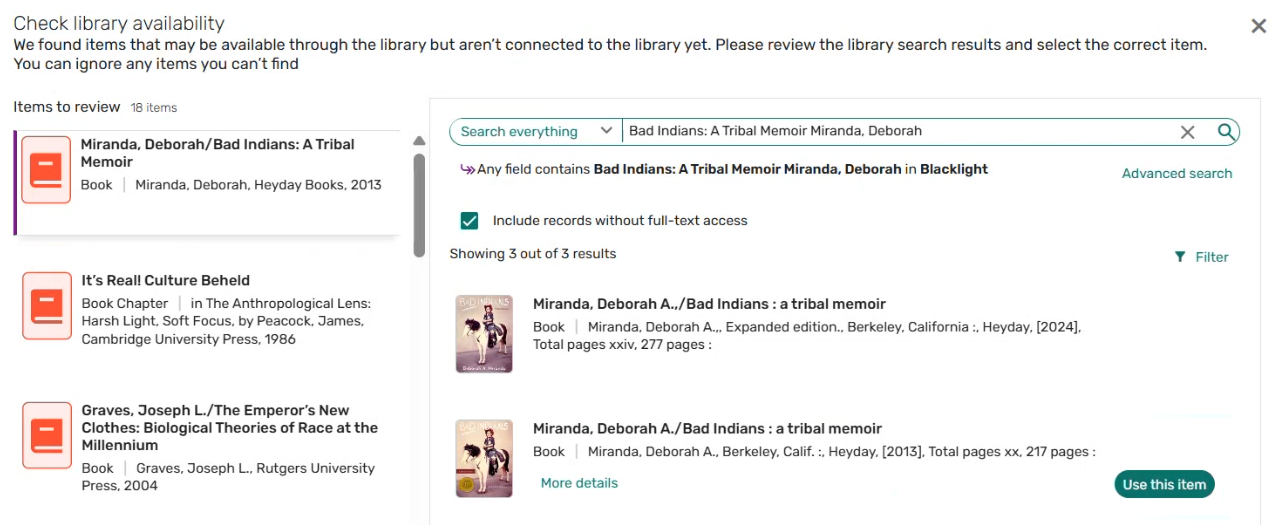
From this screen, instructors or library staff can search the library collection to locate and connect the correct resources with items in their list. Instructors can also ignore items that cannot be linked, with the option to review them later.
This workflow guides instructors to review and resolve unmatched items, ensuring that all resources in lists created from syllabus import are connected to the library collection. It also streamlines list preparation by indicating which items still require attention after a list is created. For full details, see Link Items to Library Collection After Syllabus Import.
Classic UI Shutdown
November 2025 Leganto URM-252974
As of the November release, the Classic UI is no longer supported in Leganto. All customers have been transitioned to the New UI, with no option to revert to the old interface. This change ensures that all librarians, instructors, and students have a consistent and fully supported user experience.
As part of this change:
- All Classic UI configuration tables and parameters were removed.
- The suffix New UI was removed from table and parameter names, since the New UI is now the default experience.
- The parameters that previously enabled or disabled the New UI have been retired.
The View PDF and assignment pages continue to use the Classic UI look and feel. As a result, the Labels – Classic UI table remains available in Configuration > Leganto > General > Labels.
Additional Enhancements
-
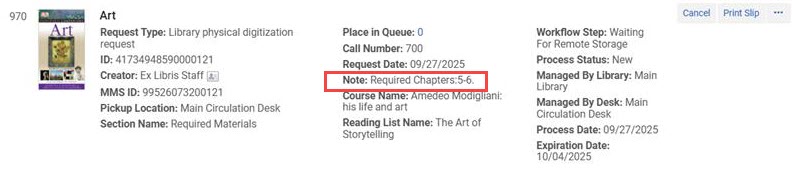
November 2025 Leganto URM-216709 Digitization requests submitted from Alma or Leganto now include chapter numbers in the request note within Alma. This enhancement gives librarians clearer visibility into which specific sections of a work were requested.
-
November 2025 Leganto URM-249867 When new items that are automatically marked as Complete are added to a list with the Complete status, the list now retains its status. Previously, the list status would change according to the list_new_citation_in_completed_list parameter (Configuration > Leganto > List Management > Course Reserves Automatic Statuses), requiring library staff to manually revert it. This update streamlines list management and reduces unnecessary administrative work.
-
November 2025 Leganto URM-252565 Institutions can now configure Leganto to automatically update an item’s status when its linked purchase request in Rialto is completed. This enhancement reduces manual updates and ensures that course materials acquired through Rialto are accurately reflected in Leganto.
The new parameter rialto_purchase_complete(Configuration > Leganto > List Management > Course Reserves Automatic Statuses) enables libraries to define which status is applied when a purchase is complete. For details, see Configuring Default Statuses for Citations/Reading Lists.
-
November 2025 Leganto URM-254835 To strengthen security, file types that may contain executable code are now blocked from being uploaded anywhere in Leganto. The list of blocked file types includes:
- Executables (.exe, .msi, .com, .scr, .pif)
- Windows scripts (.bat, .cmd, .js, .jse, .vbs, .vbe, .wsf, .wsc, .wsh)
- PowerShell scripts (.ps1, .ps2, .psc1, .psc2)
- Unix/Linux/macOS scripts (.sh, .bash, .zsh, .csh, .tcsh, .ksh)
- Programming scripts (.pl, .py, .rb, .php, .cgi)
- Executable archives and libraries (.jar, .dll, .ocx, .sys, .drv)
This enhancement reduces the risk of malicious files being accidentally uploaded, providing a safer working environment for all Leganto users.
-
November 2025 Leganto URM-248924 Institutions can now control whether instructors can add items from Primo to draft lists in Leganto. This enhancement enables libraries to better align the Push to Reading list workflow with their list management practices.
A new parameter,primo_add_to_list(Configuration > Leganto > Discovery > Primo Settings), determines which lists are available when users add items from Primo. When set to all(default published), users can add items to both published and draft lists.
-
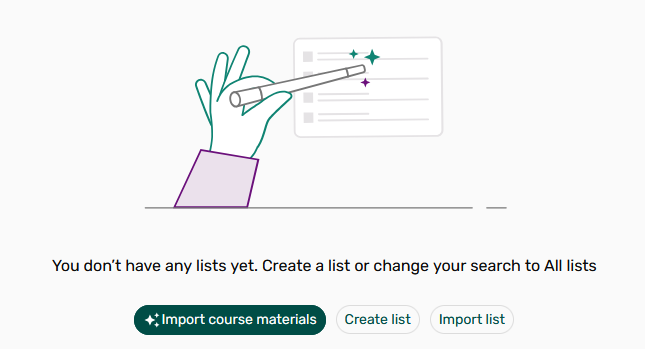
November 2025 Leganto URM-255016 When instructors or librarians have no existing lists in My Lists, Leganto now offers an additional option to create a list. In addition to starting from scratch or importing a list, users can now also upload a syllabus and use AI to create their first list (see Creating a List from a Syllabus).
Visibility of this option depends on the parameter leganto_import_syllabus(Configuration > Leganto > List Management > List Creation). When set to all, both instructors and librarians see the option; when set to library, only librarians do.
This enhancement enables users to quickly turn existing course content into a fully structured list.
-
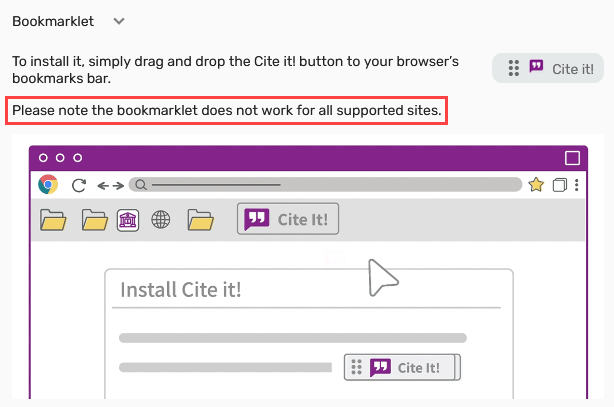
November 2025 Leganto URM-254351 A new label has been added to the Cite it! bookmarklet section:Please note that the bookmarklet does not work for all supported sites. This clarification sets accurate expectations for users collecting resources across different platforms with the bookmarklet version of the Cite it! feature.
-
November 2025 Leganto URM-224952 When exporting a list to PDF, the file now uses the list name as its filename. This change makes it easier for instructors and librarians to identify and organize exported lists.
-
November 2025 Leganto URM-237554 The Citation status drop-down menu when managing items in bulk in Leganto is now sorted alphabetically, matching the order of Alma’s Change Status menu. The option Complete remains the default selection.
-
November 2025 Fulfillment and Resource Sharing URM-246521 A new checkbox,Locate journals, has been added to the Process and Enrich Citations(Fulfilment > Advanced Tools – Reading Lists > Process and Enrich Citations) and the Reading List Citation Process and Enrich jobs (Admin > Manage Jobs and Sets > Run a Job).
When you select this checkbox, Leganto attempts to locate journal items within the library repository. By default, the checkbox is not selected. This option should be used only when the set includes journals and no article citations.


-
November 2025 Leganto URM-248103 When a syllabus file cannot be processed due to content filtering, the following error message is now displayed:Cannot be processed due to LLM content filtering. Please create your list manually.
This update provides clear, accurate information about why a syllabus upload failed, helping reduce confusion and guiding users to the appropriate next step.
-
November 2025 Leganto URM-246401 In multicampus setups, Leganto now applies the campus assigned to a user when a course campus is not defined.
If the course has no campus, or the list is not linked to a course, Leganto uses the campus listed on the user record. If the user has no campus assigned, the default campus is used. This change ensures that library searches and availability filters are always tailored to the correct campus context.
Resolved Issues
| SF number | Description |
|---|---|
| 08153820 URM-314690 | When exporting an article to RIS format, the Y1 field was incorrectly derived from the publication field instead of the Leganto year field. This was fixed. |
| 08153822 URM-314551 | When exporting a book chapter to RIS, chapter authors and additional authors were concatenated into a single field instead of separate ones. This was fixed so that each author is exported into individual fields. |
| 08140792 URM-314087 | The display_digital_representations and display_inactive_digital_representations parameters were not applied to the search results page, causing online indicators to display incorrectly. This was fixed. |
| 08127808, 08132652 URM-313741 | After editing an item, the student notes added to that item were not immediately visible and required a page refresh. This was fixed. |
| 08116981 URM-255012 | Users with Fulfillment roles were able to add and remove tags even after the relevant privileges were removed. This was fixed so that tag actions now respect assigned privileges. |
| 08104700 URM-254370 | In mobile view, My Lists labels displayed incorrectly. This was fixed so that the labels now match the regular screen view. |
| 08089850 URM-254166 | The physical availability display for IZ records did not use the same color coding as NZ records and lacked a text label. This was fixed so that both IZ and NZ records display Physical with the correct color and icon. |
| 08094259 URM-254060 | Adding or removing tags via bulk actions incorrectly changed the status of non-Completed items when revert_citation_status_by_adding_tags and revert_citation_status_by_removing_tags were configured. This was fixed so that only Completed items are affected by these actions. |
| 08072204 URM-253959 | Course Loader sometimes displayed misleading error messages in the Failed Records section when a new course was correctly created during rollover. This was fixed so that only true failures are reported. |
